Your account Step 23 of 35
Alert channels and webhooks
Send alerts to Slack, Microsoft Teams, a signed webhook or a ConnectWise PSA board, choose webhook events, check a channel's health, and verify signatures.
Updated
Alerts are emailed to the people who can act on them. Channels send the same alerts somewhere your team already looks, once per change. They’re under Channels on the Alerts page.
Channels are a plan feature; where your plan doesn’t include them the section says so, and alerts are still emailed. Adding, testing, pausing and removing channels needs the Analyst, Admin or Owner role.
Add a channel
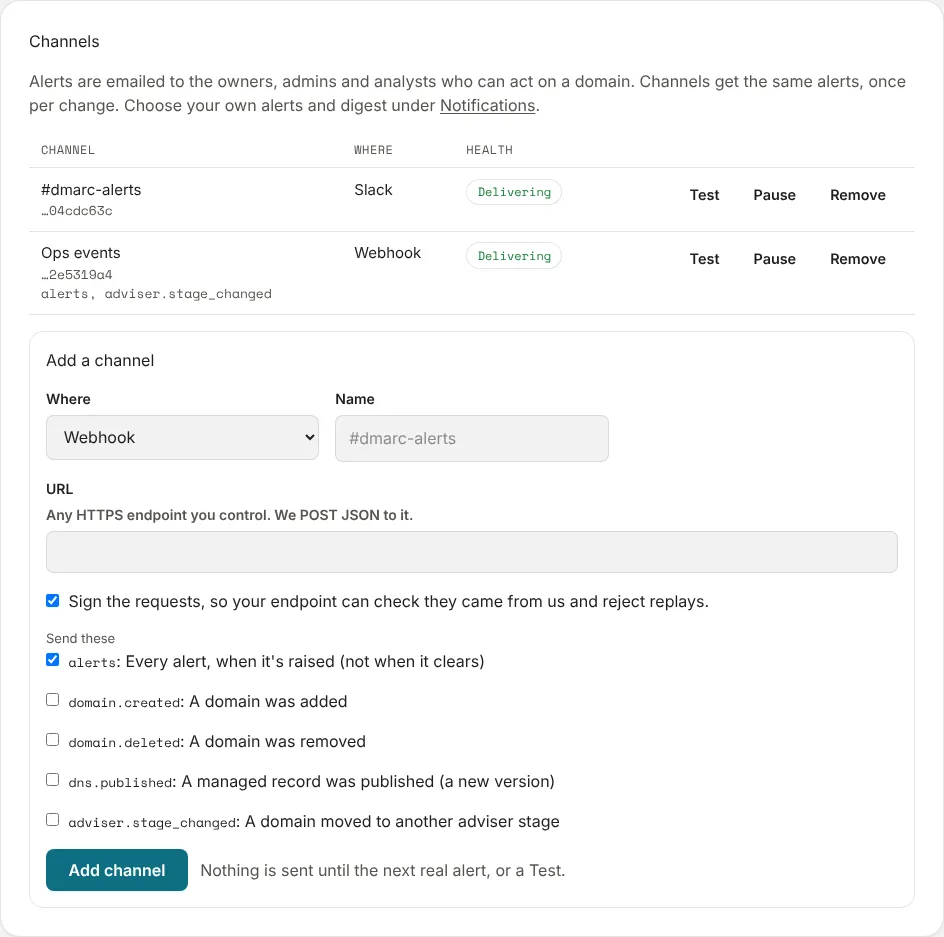
Under Add a channel, choose Where, give it a Name, and fill in the rest:
- Slack: the URL from a Slack app’s Incoming Webhooks page. It starts
https://hooks.slack.com/. - Microsoft Teams: in the Teams channel, open Workflows, choose “Send webhook alerts to a channel”, then copy the link.
- Webhook: any HTTPS endpoint you control. We POST JSON to it.
- ConnectWise PSA (MSPs): opens a ticket for each alert on a service board, and adds a note to it when the alert repeats and a Resolved note when the condition clears; closing the ticket is left to you. It asks for your Site, Codebase, Company ID (login), an API member public key and Private key, your Client ID, the Service board ID, the Company record ID for tickets, and the Priority ID: high / medium / low to use for each alert’s severity.
In an MSP, Scope sends a channel Everything in this account, or one client’s alerts only.
Choose Add channel. Nothing is sent until the next real alert, or a Test.
Health
Each channel shows its health: Delivering, Nothing sent yet, Paused, or how many deliveries failed in a row, with the last error. After five failures in a row, the people who receive alerts get an Alert channel failing email.
- Test sends a test message now.
- Pause stops deliveries until Resume.
- Remove deletes the channel.
Webhooks
A webhook chooses what it’s sent under Send these:
| Event | What |
|---|---|
alerts |
Every alert, when it’s raised (not when it clears). On by default |
domain.created |
A domain was added |
domain.deleted |
A domain was removed |
dns.published |
A managed record was published (a new version) |
adviser.stage_changed |
A domain moved to another adviser stage |
An alert is sent once, when its condition starts. Nothing is sent when it
clears, or while it stays true; the Alerts page shows what’s still active.
Each alert request is JSON:
{ type, key, severity, title, detail, org, domain, url, resolved, createdAt },
where type is the alert’s kind, key identifies the condition, and
resolved is always false.
Every other event is JSON: { type, id, org, createdAt, data }.
Checking the signature
With Sign the requests ticked (the default), your endpoint can check each
request came from us and reject replays. The signing secret is shown once,
when you add the channel; store it then. Each request carries a
Webhook-Signature header:
Webhook-Signature: t=<unix time>,v1=<HMAC-SHA256(secret, "t.body")>
To check it, compute HMAC-SHA256 with the secret over the timestamp, a full
stop, and the raw request body, and compare it with v1 in constant time.
Reject a request whose timestamp is more than a few minutes old.
Next
Stuck? Reply to any email DMARCLoop sends, or contact us — a person reads it.