Moving to enforcement Step 10 of 35
The 14-day review: moving to p=quarantine
When the adviser says to test p=quarantine (14 days of reports) and enforce it (30 days), exactly what it checks, and how to make each change.
Updated
p=none only watches. The first step towards protecting your domain is
p=quarantine, which asks receivers to send mail that fails DMARC to the
recipient’s junk folder. It’s a step you take when the evidence says your own
mail will pass, and the Next step panel on the domain’s Overview tells
you when that is.
Quarantine is also the step that can be undone. Mail that fails goes to junk,
not nowhere, so if a sender you missed starts failing the recipient can still
find the message, and you can fix the sender without anything having been
lost. That’s why it comes before p=reject.
Fourteen days is the earliest the adviser suggests the first step, not a date to aim for. Most domains take longer, and that’s fine.
The Next step panel
The panel’s heading is its recommendation. The row of stages under it shows
where the domain is on the way to p=reject: Discover, Fix sources,
Quarantine, Reject, Maintain, with how many days it has been in
the current one. Then a line of evidence: days of reports in the last 90,
messages in the last 30, and the share passing DMARC.
The adviser reassesses every domain once a day. Check now reads the domain’s DNS and reassesses it straight away, for example after you’ve edited the record.
What it checks
These are the checks, exactly as the adviser runs them:
| Check | To test quarantine (t=y) |
To enforce quarantine | Why |
|---|---|---|---|
| Days of reports | at least 14 | at least 30 | Two weeks covers weekly senders; a month covers monthly ones. |
| Messages observed | at least 100 | at least 100 | Below that, a pass rate is noise rather than evidence. |
| Mail passing DMARC | at least 95% | at least 95% | Most of your mail must already be authenticated. |
| Persistent failing sources | none | none | See below. |
Days of reports are days actually covered by reports in the last 90 days, not days since you added the domain. The pass rate and failing sources are judged over the last 30 days.
A persistent failing source is one that has failed DMARC on three or more separate days with meaningful volume: 50 messages, or half a percent of the domain’s mail, whichever is lower. A pass rate alone can’t tell “0.5% spoofing” from “0.5% is the payroll system nobody set up”, but the payroll system turns up every week and a spam run doesn’t. So a persistent failing source blocks the recommendation by name, however good the overall percentage looks. Forwarded mail never counts against you here.
While something is in the way
Until every check passes, the panel says Keep monitoring (there isn’t enough evidence yet) or Resolve these sending sources (there is, but mail is failing). What’s in the way lists each blocker on its own line:
- “9 of 14 days observed”: wait.
- “Not enough mail observed”: wait; a low-volume domain gets there more slowly.
- “90.3% aligned (needs 95%)”: work through the Known sender, failing and Unknown or threat groups in Sources.
- “HubSpot keeps failing (29 days, 512 messages)”: that source keeps failing. Follow the link to it.
Today lists what to do about each, with the sender’s fix guide when we recognise it.
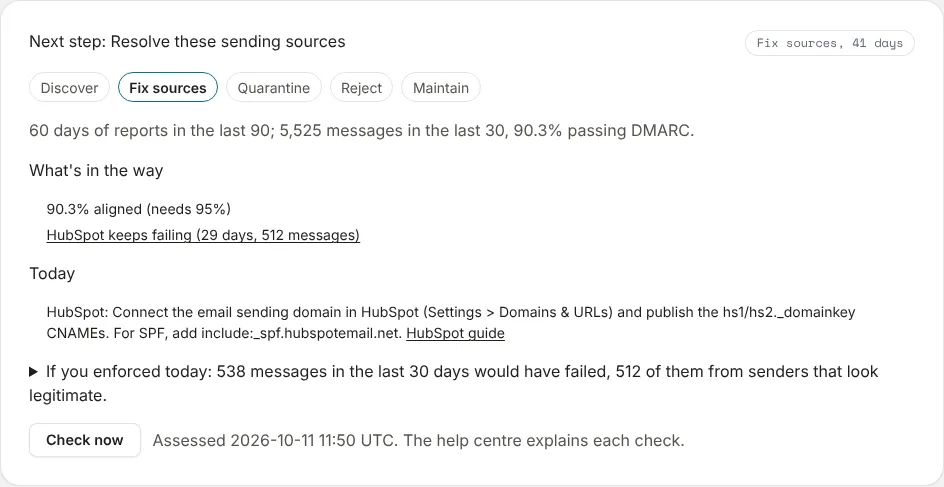
If you enforced today opens a simulation: how many messages in the last 30 days would have failed, how many of them from senders that look legitimate, and which sources they came from.
Ready to test
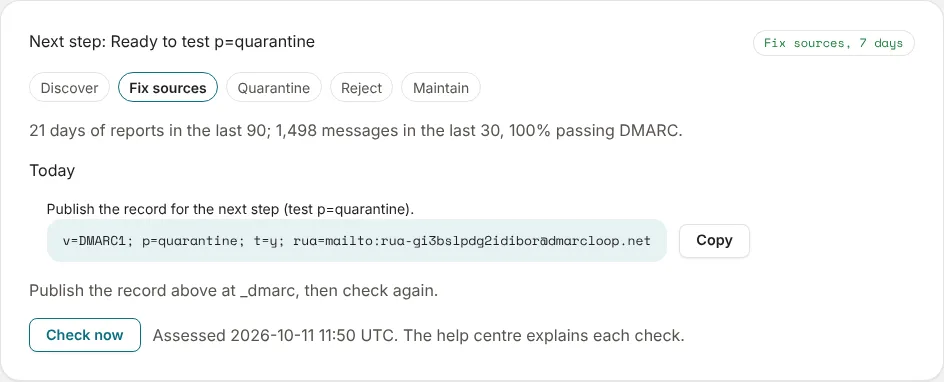
When the checks pass, the panel says Ready to test p=quarantine, and Today gives the exact record for the step, with a Copy button. People who receive alerts get a one-off Ready to tighten policy email. Nothing changes until the record does.
Test first, then enforce
DMARCbis (RFC 9989) replaced the old pct percentage rollout with a test
flag, t=y. With Test mode on, receivers apply one step less than the
policy: p=quarantine; t=y is treated as p=none, and p=reject; t=y as
p=quarantine. So each step up is two changes:
-
Publish
p=quarantinewitht=y, keeping everything else, including theruaaddress:v=DMARC1; p=quarantine; t=y; rua=mailto:rua-…@dmarcloop.net -
Leave it until the adviser is ready. It waits for 30 days of reports before it says Ready to enforce p=quarantine: enough for a monthly sender, such as invoicing or payroll, to have appeared.
-
Remove
t=y. From then on, receivers send failing mail to junk:v=DMARC1; p=quarantine; rua=mailto:rua-…@dmarcloop.net
How you make each change depends on how DMARC is managed:
- Hosted: the panel has Apply this step, which publishes the new version for you. Or choose Change on the DMARC card of the DNS records tab. See Hosted records.
- Self-managed: the panel says Publish the record above at _dmarc, then check again. Edit the record at your DNS host, then choose Check now.
A receiver that hasn’t implemented DMARCbis yet may not recognise t=y and
apply the policy as written. That’s one more reason the adviser waits for the
evidence before it suggests even the testing step; at quarantine the worst case
is mail in a junk folder.
If something goes wrong after you enforce
If a domain is enforcing while a recognised sender keeps failing, the panel says Mail is being affected right now, lists it under Failing now, and people who receive alerts get a Mail being blocked email. Fix the sender rather than loosening the policy. If DMARC is hosted, the panel also offers Step the policy back, which publishes the previous step.
Next
Stuck? Reply to any email DMARCLoop sends, or contact us — a person reads it.