Reports Step 18 of 35
MTA-STS and TLS reports
How DMARCLoop checks your MTA-STS policy every day, collects the TLS reports senders send about mail arriving at your domain, and the order to publish them in.
Updated
Everything else in DMARCLoop is about your outbound mail: who sends as your domain and how receivers judge it. Inbound TLS is the other direction: whether mail arriving at your domain travels over an encrypted connection.
Two standards cover it:
- MTA-STS (RFC 8461) tells sending servers that they must use TLS to reach
you, and which of your mail servers to trust. It’s a TXT record at
_mta-sts.<domain>plus a policy file served over HTTPS atmta-sts.<domain>. - TLS-RPT (RFC 8460) asks sending servers to report whether they could.
It’s one record at
_smtp._tls.<domain>.
What is MTA-STS? covers the background. Both are on the domain’s Mail security tab.
Publish TLS-RPT first
TLS-RPT changes nothing about how mail is handled: it only asks senders to tell you what they saw. That’s why it goes up before any MTA-STS policy. It’s the instrument that tells you whether enforcing would be safe.
On the domain’s DNS records tab, under More records, choose
Set up TLS-RPT. Reports always go to your organisation’s TLS address; add up
to four others of your own (an email address or an https: URL). Save it
hosted or self-managed like any other record; the self-managed record looks
like:
_smtp._tls.example.com TXT "v=TLSRPTv1; rua=mailto:tls-…@dmarcloop.net"
The first TLS report usually arrives within a day or two. Large senders report daily, and only senders that deliver mail to your domain send one.
TLS reporting
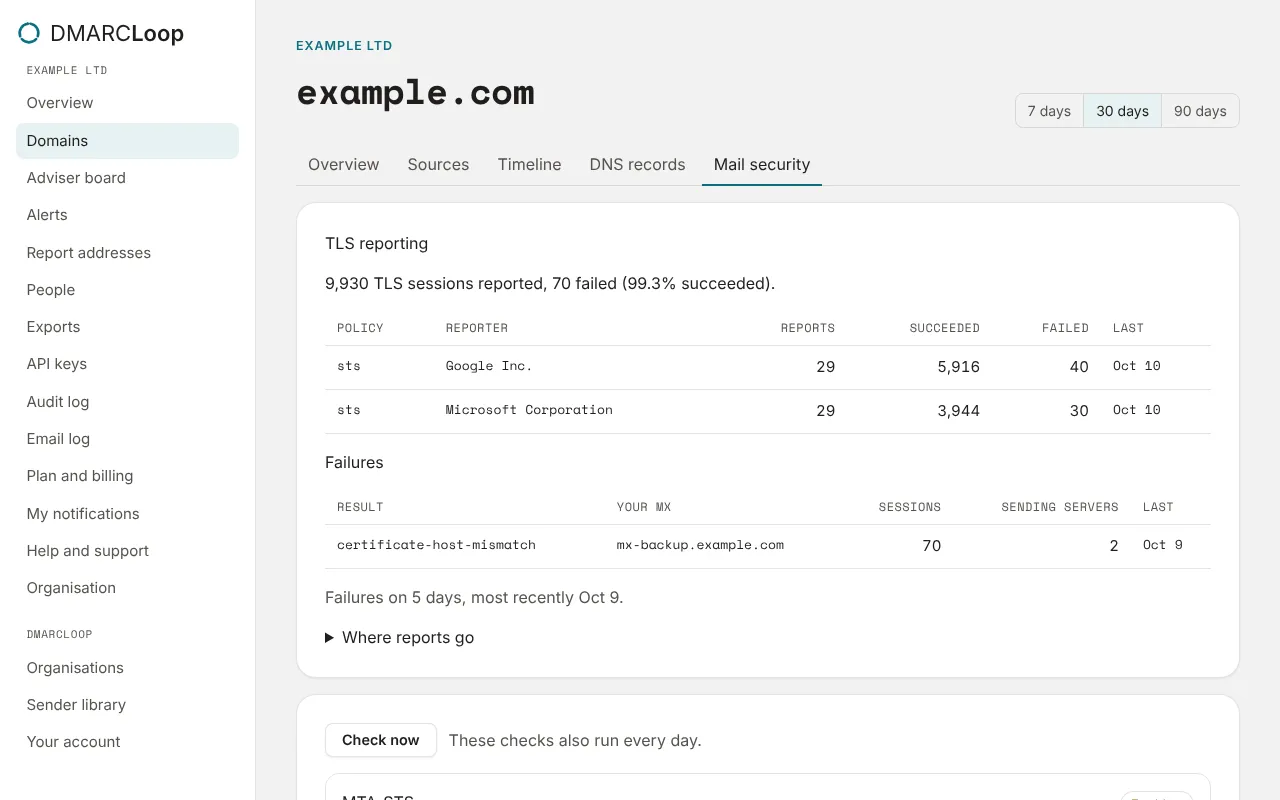
The TLS reporting section on Mail security shows the window’s sessions: how many senders reported, how many failed, and the share that succeeded. Under it:
- one row per policy and reporter: the policy type senders applied (
stsonce your MTA-STS policy is up), the reporter, its reports, and the sessions that succeeded and failed; - Failures: each result type (for example
certificate-host-mismatch), Your MX it happened at, the failed sessions, how many sending servers saw it, and when it was last seen; - Where reports go: the email address and HTTPS endpoint senders report to.
TLS reports are collected on every plan, and shown on plans with TLS reporting; pricing lists which.
The MTA-STS check
The MTA-STS card reads the _mta-sts record and fetches the policy every
day; Check now does it straight away. Its status is one of:
| Status | Meaning |
|---|---|
| In place | A policy in enforce mode that parses and covers your mail servers. |
| Testing | A policy in testing mode: senders report, but deliver anyway. |
| Broken | The record or policy can’t be read or doesn’t parse, or an enforcing policy doesn’t cover your mail servers. |
| Not published | No _mta-sts record. |
The card shows the policy’s mode, max_age and MX patterns, and anything
wrong with it.
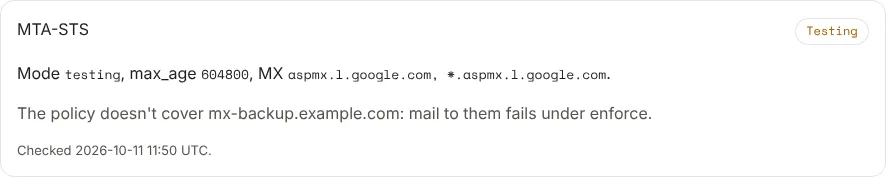
The MX cross-check is the point. A policy whose mx patterns don’t cover
every one of your mail servers has mail to those servers refused once you
enforce, with nothing in DMARC to explain it. The card names them: The policy
doesn’t cover mx-backup.example.com: mail to them fails under enforce. If an
enforced policy breaks, people who receive alerts get MTA-STS policy broken.
The order to do it in
- Publish TLS-RPT, and wait for a week or two of reports.
- Publish an MTA-STS policy in
testingmode. The free MTA-STS generator writes the record and the policy file; you serve the file frommta-sts.<domain>. - Watch TLS reporting for failures, and fix each one at the mail server it names.
- When the reports are clean and the card has nothing to fix, change the
policy to
mode: enforceand update the record’sid.
Next
Stuck? Reply to any email DMARCLoop sends, or contact us — a person reads it.