Reports Step 16 of 35
Read a domain's DMARC data
What a domain's Overview and Timeline tabs show, what the numbers mean, and why a high pass rate is not the same as a low spoofing rate.
Updated
Everything DMARCLoop shows about a domain’s mail comes from the aggregate reports receivers send: one per receiver per day, each listing the servers that sent mail as the domain, how many messages, and how each did on SPF, DKIM and DMARC. Open a domain from Domains or the Overview to see them.
Every tab has a window picker: 7 days, 30 days or 90 days. How far back you can go also depends on your plan’s report history.
Overview
The four figures at the top:
- DMARC pass: the share of messages that passed DMARC, and how many of how many. A message passes when SPF or DKIM passes and is aligned with the domain in its From address.
- Messages: every message receivers reported in the window.
- Published policy: the policy receivers reported seeing, such as
quarantine, with the full value under it. - Quarantined or rejected: messages receivers sent to junk or refused
because of your policy. At
p=noneit is zero.
Under them, the Next step panel (see the 14-day review), Volume and compliance over the window, Sources in their four groups with each group’s messages and share, and Subdomains seen when mail used a subdomain in its From address.
Timeline
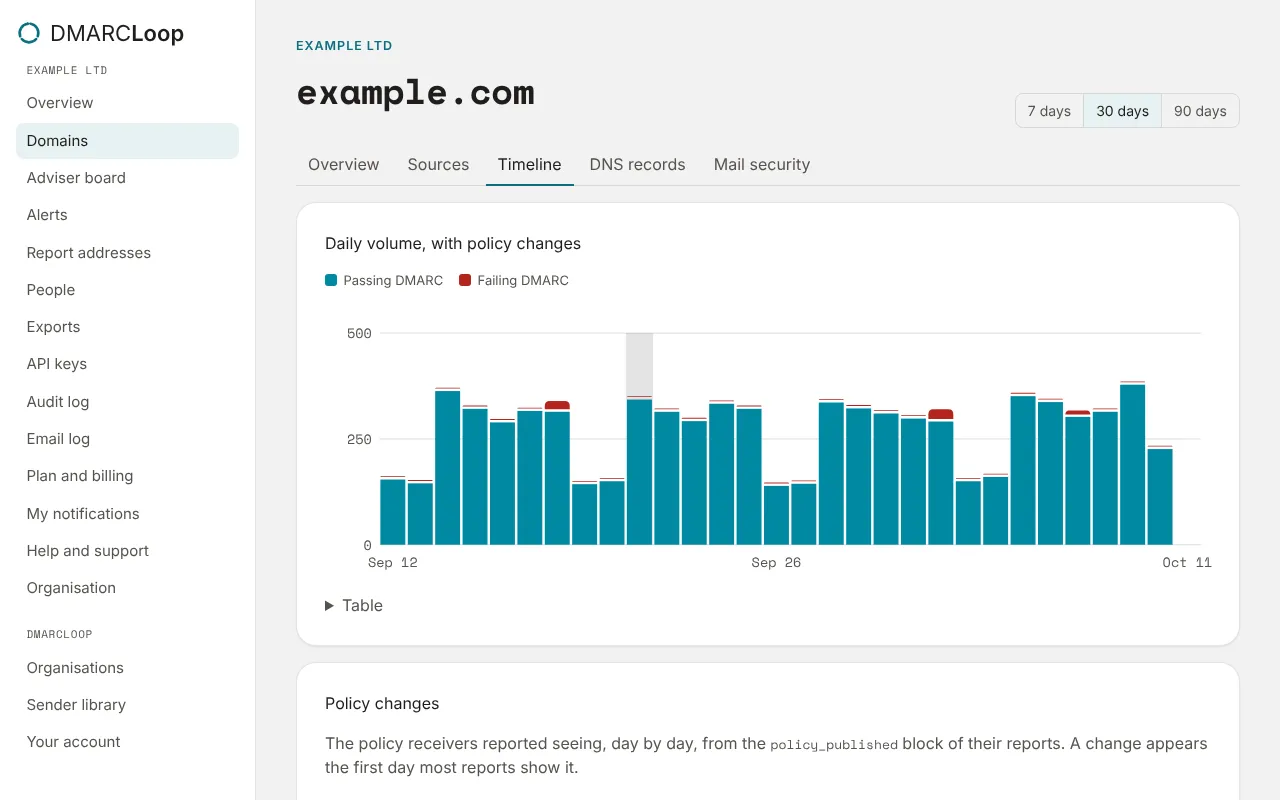
The Timeline tab is the same data day by day:
- Daily volume, with policy changes: the chart, with each change of policy marked.
- Policy changes: the policy receivers reported seeing, from the
policy_publishedblock of their reports. A change appears the first day most reports show it, so it confirms receivers saw the edit you made. - By day: messages, the share passing, and how many were quarantined and rejected, newest first.
A high pass rate isn’t a low spoofing rate
DMARC pass is a share of all the mail reported for the domain, yours and everyone else’s. A domain that sends a lot of its own mail can show 99% while a spoofer sends thousands of messages a day as it; a domain that sends little can show a poor rate when it is mostly spoofing. Read the Sources groups, not the percentage, to know which: what matters is that everything in Known sender, failing is fixed, and that Unknown or threat is mail you don’t recognise. See Identify your sending sources.
Getting the data out
Download sources (CSV) on the Sources tab saves the domain’s sources. Exports has the domains sheet and a PDF report for every domain; see Exports and scheduled reports.
Next
Stuck? Reply to any email DMARCLoop sends, or contact us — a person reads it.