Your account Step 24 of 35
Manage billing and invoices
Plan and billing shows your plan, its status and your usage, changes the plan and add-ons, and opens Stripe for your card, invoices and cancelling.
Updated
Plan and billing, in the left sidebar, is where you see your plan, how much of it you use, change it, and reach your card and invoices. For what the plans include, see Choose a plan and pricing.
It’s shown to Owners, Admins and the Billing role, and all three can change the plan.
Your plan and usage
The top of the page names the plan and its status, then the usage meters:
- Domains and Users (including pending invitations), against the plan’s limits.
- Messages reported this calendar month: every message the aggregate reports show for your domains, passing DMARC or not. Going over holds nothing back; the meter says Over the allowance. Nothing is held back, but you’ll need to upgrade if it continues.
- Report history: how far back report data is kept.
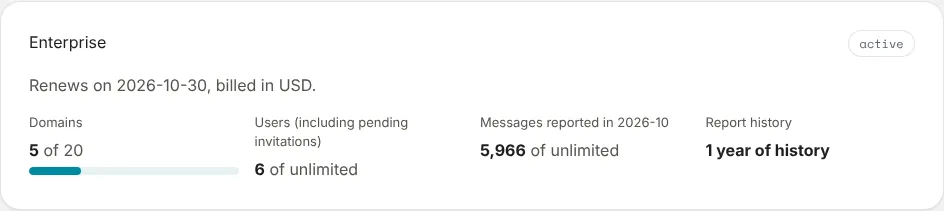
On a paid plan the page says when it Renews (or Ends, once you’ve cancelled) and the currency you’re billed in. If a payment fails, the status says so and the page asks you to update your card to keep your plan.
Changing plan and add-ons
Each plan is listed with its price and what it includes. Choose starts a subscription through Stripe; once you have one, Switch moves to another plan. Add-ons your plan offers, such as Additional domains, are under Add-ons: set them and choose Save add-ons.
Moving down a plan takes effect at the end of a grace period, not at once. See Changing plan later.
Card, invoices and cancelling
Payment methods, invoices and cancellation opens Stripe’s customer portal. There you change the card, download invoices and receipts, and cancel. Your card is held by Stripe and entered only on Stripe’s pages, never on ours.
Invoiced accounts and clients
An organisation billed by invoice shows Invoiced, the date it’s paid through and when its term ends: Contact us to change plan.
A client of an MSP is billed through the MSP: its page says This organisation is billed through its MSP. MSP pricing is agreed with each MSP; talk to us.
Next
Stuck? Reply to any email DMARCLoop sends, or contact us — a person reads it.