For MSPs Step 32 of 35
Import domains in bulk
Add up to 200 domains at once from a CSV, for one organisation or many clients, see what every row will do first, then download the records each one needs.
Updated
Import from CSV, on the Domains page, adds many domains at once: it sets each one up as the setup wizard would, and gives you one sheet of every record to publish. Nothing is added until you’ve seen a preview of what every row would do. It works in any organisation and needs the Owner or Admin role; your plan’s domain limit still applies.
The file
A CSV with a header row. Only domain is required:
| Column | What |
|---|---|
domain |
The domain. Required. |
client |
MSPs only: a client’s name. A name that isn’t a client yet creates it. Blank adds the domain to your MSP organisation. |
group |
A group, as on the Domains page. |
tags |
Tags, separated by ;. |
sends |
yes or no. no locks the domain down. |
dmarc, spf |
hosted, self or none. Blank picks hosted where your plan has it. |
At most 200 domains per import. Download a template gives you a file with the header and two example rows:
domain,client,group,tags,sends,dmarc,spf
example.com,,Marketing,brand;primary,yes,hosted,hosted
example.net,,,parked,no,,
Preview, then import
- Choose a CSV file, or paste it under Or paste it.
- Choose Preview. Each row is listed with its line number, domain, client (with (new) when the import will create it), whether it sends mail (or no: lockdown), how DMARC and SPF will be managed, and its Problems: Ready, or what’s wrong, such as a domain that’s already added.
- Fix the file until every row is Ready, and preview again. Import stays unavailable while anything has a problem.
- Choose Import (it says how many domains).
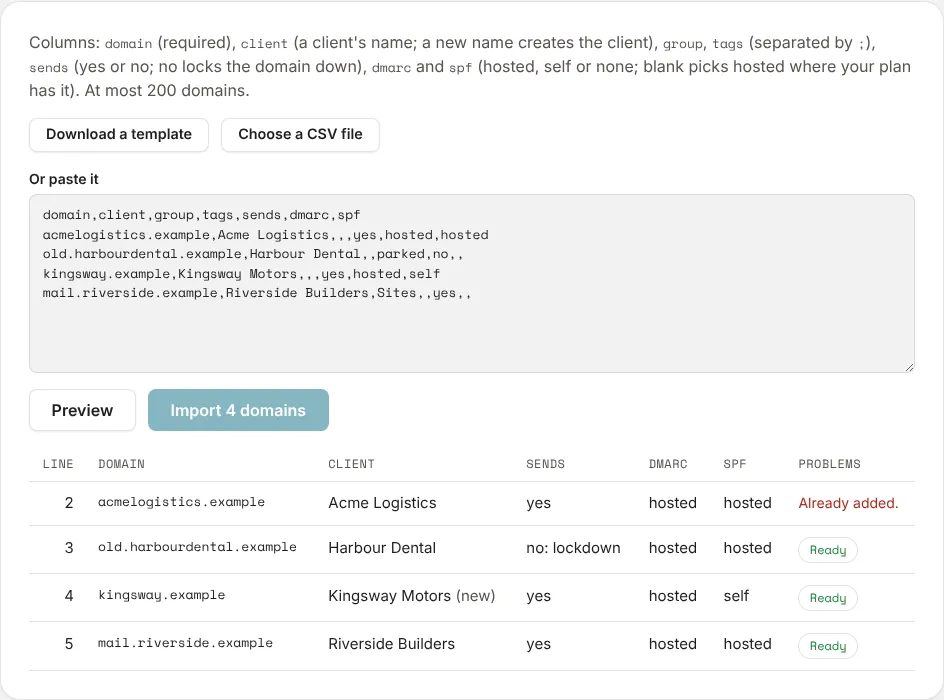
The page then says how many domains were imported, and how many clients were created. Any row that failed is listed with its line, domain and reason.
Publish the records
Download the DNS records sheet is a CSV of every record each imported domain needs, with what each is for. Send it to whoever edits DNS, or work through it yourself. The same sheet is on the Domains page as Download DNS records sheet, and each domain’s DNS records tab shows its records and whether they’re in place.
Next
Stuck? Reply to any email DMARCLoop sends, or contact us — a person reads it.