Your first domain Step 7 of 35
Check the records are in place
How the DNS records tab shows whether each record is published, what each status means, how often we check, and where its history is kept.
Updated
A domain’s DNS records tab is where you see whether what you published is what we asked for. Open the domain from Domains and choose DNS records.
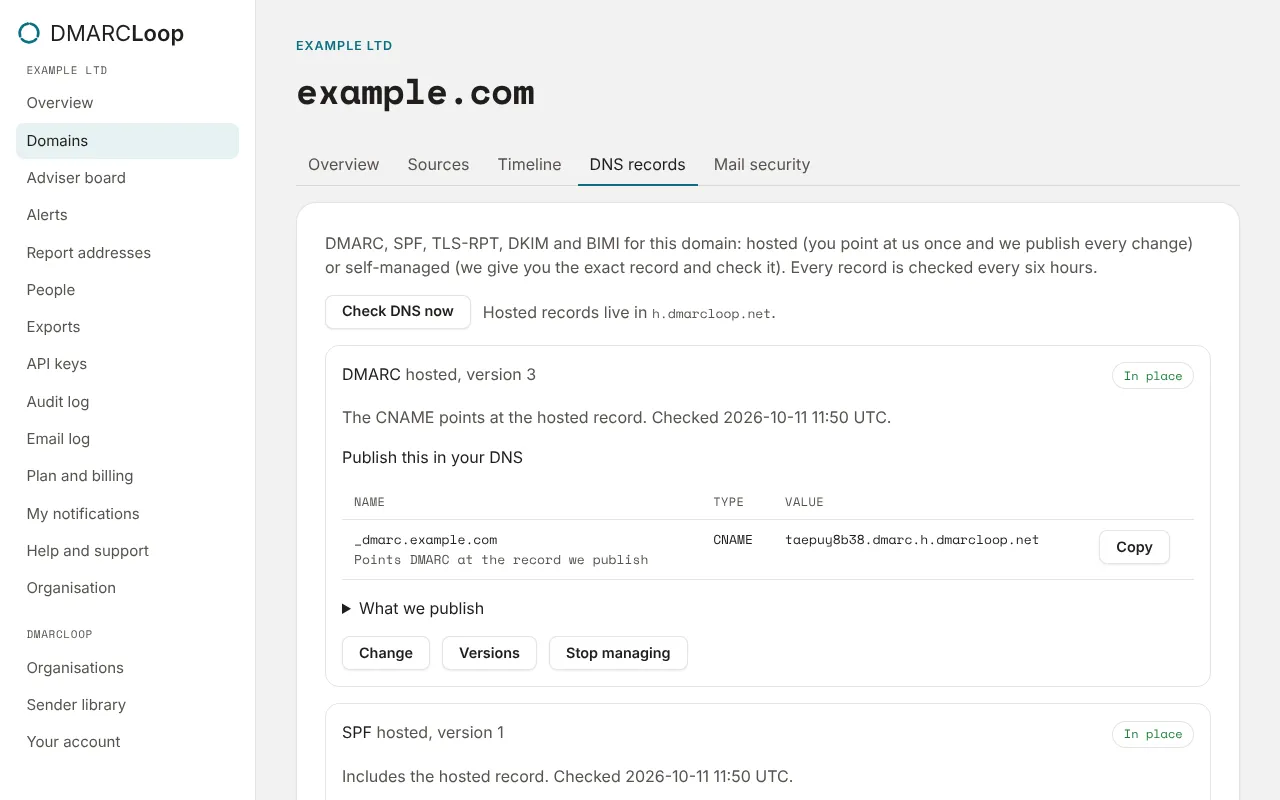
What each record card shows
Each record you manage here (DMARC, SPF, and TLS-RPT, DKIM and BIMI once set up) has a card with:
- whether it is hosted or self-managed, and its version number;
- its status, with a sentence saying what we saw and when we last checked;
- Publish this in your DNS: the exact record, with a Copy button;
- for SPF, how many DNS lookups a receiver makes to evaluate it (the limit is 10).
| Status | Meaning |
|---|---|
| In place | What’s published matches: for hosted records, the CNAME or include points at us. |
| Missing | Nothing is published at that name yet. |
| Different | Something is published, but not what we asked for. The sentence under it says what differs. |
| Not checked | We haven’t looked yet. |
| Lookup failed | The DNS lookup didn’t answer. It’s retried on the next check. |
When we check
Every record is checked every six hours. Check DNS now checks this domain’s records straight away, for example right after you publish a change.
If a record stops being in place, people who receive alerts are emailed: a self-managed record that no longer matches raises DNS record changed, and a hosted CNAME or include that no longer points at us raises Hosted DNS delegation broken. See Notifications and alerts.
DNS history
DNS history, at the bottom of the tab, lists what happened to the domain’s records, newest first: each version published, each check that found a record in place or broken.
Records not set up yet
If DMARC or SPF isn’t managed here yet, the tab says so with a link to Run the setup wizard. More records sets up TLS-RPT, DKIM and BIMI; see MTA-STS and TLS reports and DKIM keys and BIMI.
Stop managing removes a record from DMARCLoop. For a self-managed record your DNS isn’t changed. For a hosted one we stop publishing, so publish your own record first.
Next
Stuck? Reply to any email DMARCLoop sends, or contact us — a person reads it.