Reports Step 19 of 35
DKIM keys and BIMI
How the Mail security tab checks every DKIM selector daily, when to rotate a key, how to host DKIM, and how to publish a BIMI logo once you enforce.
Updated
DKIM is what keeps your mail passing DMARC when it’s forwarded, so a missing or weak key is worth knowing about before receivers find it. BIMI is the reward for enforcing: your logo next to your mail in inboxes that support it. Both are on the domain’s Mail security tab, below TLS reporting.
DKIM keys
The DKIM keys card lists the domain’s selectors and looks each one up every day: Selectors from your reports and the ones hosted here, looked up daily. When we know of none, it looks up common selectors instead.
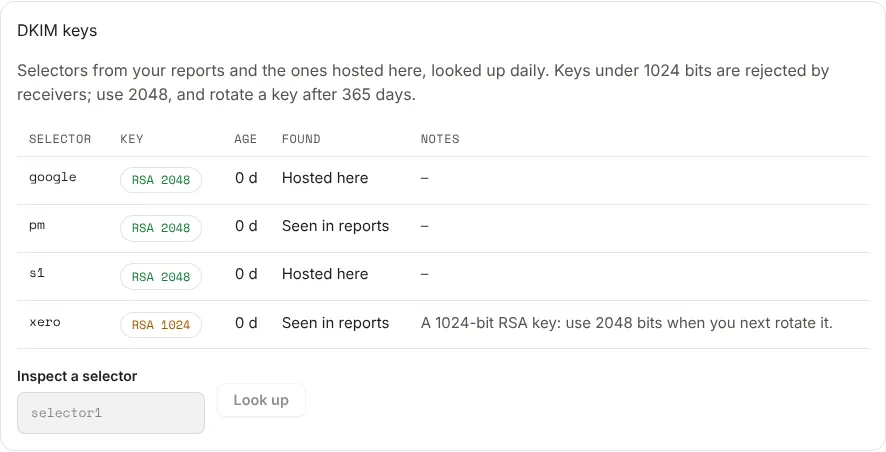
| Column | What it shows |
|---|---|
| Selector | The name before ._domainkey. |
| Key | The key type and size, such as RSA 2048; Revoked for an empty key; None when nothing is published. Green is fine, amber is worth fixing, red is a problem. |
| Age | How long we’ve seen this key. Rotate appears once it’s older than a year. |
| Found | Seen in reports, Hosted here, or Found by lookup. |
| Notes | What’s wrong, if anything. |
Keys under 1024 bits are rejected by receivers, and send a DKIM key weak
alert. Use 2048. Inspect a selector looks up any selector on demand: enter
just the selector, such as selector1, and choose Look up.
A selector Seen in reports with no key published usually means a sender signs as your domain with a key you never published, or one that was removed. Check the sender’s DKIM setup; see Identify your sending sources.
Hosted DKIM
On the DNS records tab, under More records, choose Set up DKIM. For each selector your sender gives you, enter the Selector and choose how it’s Published as:
- CNAME to the sender’s key: most senders give you a CNAME target.
- The key record (TXT): the
v=DKIM1; k=rsa; p=…record itself.
Add a selector adds another, up to 20. Hosted, you publish one CNAME per selector pointing at us, and changing a key later is a change in the app. See Hosted records.
BIMI
BIMI shows your logo next to your mail in inboxes that support it, but only for
a domain at p=quarantine or p=reject. The BIMI card on Mail security
checks the record at default._bimi daily: In place, Broken or
Not published. With a mark certificate, it shows the certificate’s kind
(VMC or CMC), who it was issued to, when it expires, and whether the logo
matches it. A BIMI broken alert is sent if the logo or certificate fails a
check, or the certificate expires within 30 days.
To publish one, choose Set up BIMI under More records on the DNS records tab:
- Upload a logo (where hosted BIMI is in your plan): SVG Tiny PS, square, 32 KB or less. We check it and serve it from a fixed URL. Otherwise, give a Logo URL of your own.
- Mark certificate URL (VMC or CMC): the PEM file your certificate authority gave you, hosted on https. Gmail and Apple Mail show the logo only with one.
Next
Stuck? Reply to any email DMARCLoop sends, or contact us — a person reads it.