Getting started Step 1 of 35
Create your account
Sign up with your work email, confirm the address, and set up the organisation your domains, reports and people will belong to.
Updated
Everything in DMARCLoop belongs to an organisation: its domains, its reports, its report addresses and the people who work in it. Creating your account takes a couple of minutes: sign up as yourself, confirm your email address, then set up the organisation.
Sign up
- Go to the app’s Create an account page.
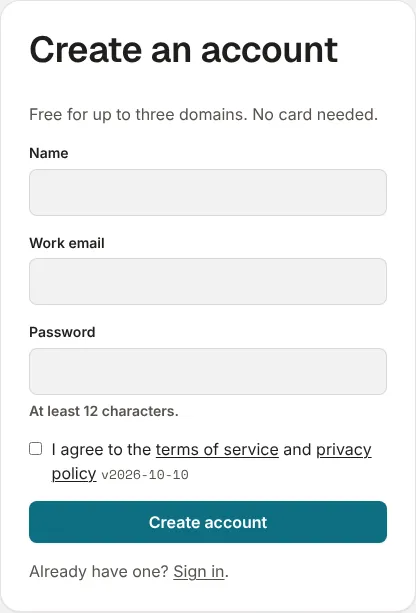
- Enter your Name, your Work email and a Password of at least 12 characters.
- Tick the box to agree to the terms of service and privacy policy.
- Choose Create account.
If a short automated check appears under the form, wait for it to finish before you submit; the page says so if you are too quick. If the page offers Sign up with Google, you can use that instead of a password.
Confirm your email address
The page changes to Check your inbox, and we email a confirmation link to the address you gave. The link expires in 24 hours. Open it on the same device: it confirms the address and signs you in.
No email? Check spam, and that the address was typed correctly. You can sign up again with the same address once the link has expired.
Set up your organisation
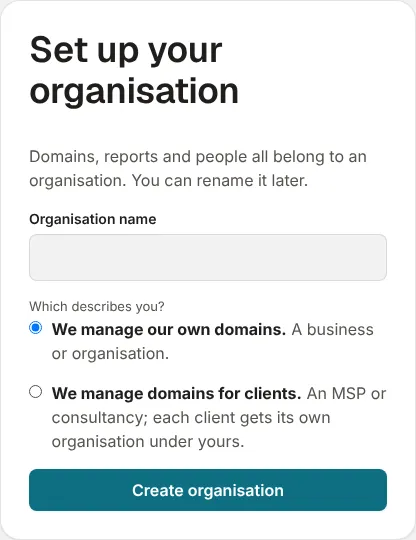
Once you’re signed in, Set up your organisation asks two things:
- Organisation name: your company’s name. People you invite and the emails we send show it. An owner or admin can change it later, under Name on the Organisation page in the left sidebar; the rename is recorded in the audit log.
- Which describes you?
- We manage our own domains. A business or organisation monitoring its own mail. This is right for most people.
- We manage domains for clients. An MSP or consultancy. Each client gets an organisation of its own under yours; see Clients, domains and who sees what.
Choose Create organisation and you land on the organisation’s Overview, ready to add your first domain.
There is a limit on how many free organisations one person can own. If you reach it, the form says so: upgrade one of them, or ask to be invited to an existing organisation instead.
Before your colleagues sign up
Colleagues who sign up on their own each get an organisation of their own, with none of your domains in it. Instead, sign up once, then invite them from People: they join your organisation with the role you choose.
One person can belong to several organisations. Organisations, in the left sidebar under the product name, lists every one you’re in, and has a Create another organisation link.
If you came from a free tool
The free checkers on this site offer to monitor the domain you just checked. Following that link to sign up takes you, once you’re set up, to the Domains page with the domain already filled in.
Next
Stuck? Reply to any email DMARCLoop sends, or contact us — a person reads it.