Your first domain Step 6 of 35
Your report addresses
The three addresses receivers send your organisation's DMARC, failure and TLS reports to, why one address serves every domain, and how to add it to a record.
Updated
Receivers send DMARC reports to whatever address a domain’s DMARC record names
in rua=. In DMARCLoop that address belongs to your organisation, not to
one domain: every domain you monitor reports to the same place, and the setup
wizard puts it into every record it writes.
Report addresses, in the left sidebar, shows all three.
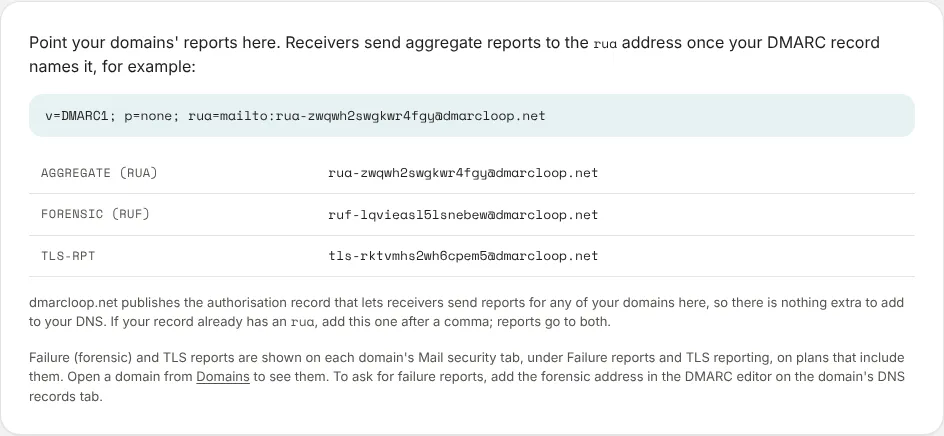
| Address | What arrives there |
|---|---|
| Aggregate (rua) | The daily aggregate reports everything else in DMARCLoop is built from. |
| Forensic (ruf) | Failure reports about individual messages; see Failure reports. |
| TLS-RPT | SMTP TLS reports about mail arriving at your domain; see MTA-STS and TLS reports. |
Each address is its type, a random code and our report domain, for example
rua-…@. The code reveals nothing about you. Copy yours from the
page rather than typing it.
Nothing extra to publish
Normally, sending a domain’s reports to an address at another domain needs an
authorisation record at that other domain. dmarcloop.net publishes one that
covers every domain, so the DMARC record is the only thing you publish.
Adding the address to a record you edit yourself
The page shows a record that uses it:
v=DMARC1; p=none; rua=mailto:rua-…@dmarcloop.net
If your record already has an rua, add ours after a comma; reports then go to
both:
v=DMARC1; p=none; rua=mailto:dmarc@example.com,mailto:rua-…@dmarcloop.net
Reports for domains you haven’t added
Because the address is the organisation’s, any domain whose record names it sends reports here, added or not. The Overview lists such domains under Reports for domains you haven’t added, with an Add domain button for each.
Next
Stuck? Reply to any email DMARCLoop sends, or contact us — a person reads it.