Moving to enforcement Step 13 of 35
Hosted records
Point a CNAME or an include at DMARCLoop once, then change DMARC, SPF, TLS-RPT, DKIM and BIMI from the app, with every version kept and one-click rollback.
Updated
Everything else in DMARCLoop watches your DNS. Hosted records are the one feature that answers it: you publish a pointer to us once, and from then on the record is published from the app. Each step up the policy ladder becomes a click instead of a change at your DNS host.
Hosting is per record and per domain. Any record can stay self-managed, where we give you the exact record and check it’s published. Hosting isn’t included on every plan; pricing lists which plans have it. Where it isn’t in your plan, the hosted option says so.
What you publish once
| Record | You publish | It points at |
|---|---|---|
| DMARC | CNAME at _dmarc.example.com |
….dmarc.h.dmarcloop.net |
| SPF | TXT at example.com: v=spf1 include:….spf.h.dmarcloop.net ~all |
the senders we resolve for you |
| TLS-RPT | CNAME at _smtp._tls.example.com |
….tlsrpt.h.dmarcloop.net |
| DKIM | a CNAME for each selector at <selector>._domainkey.example.com |
the key or the sender’s own key |
| BIMI | CNAME at default._bimi.example.com |
your logo and certificate |
The exact values are on the domain’s DNS records tab under Publish this in your DNS. The tab also says where the hosted records live, for example Hosted records live in h.dmarcloop.net. For SPF the hosted record replaces your SPF record: a domain must have only one.
Choosing hosted
In the setup wizard, or with Change on a record’s card, choose Hosted under How is this record managed? Edit the record’s settings, then:
- Preview shows the record you’ll publish and what we’ll publish, with any problems, without saving.
- Save and publish saves it as a new version and publishes it.
- Cancel leaves things as they were.
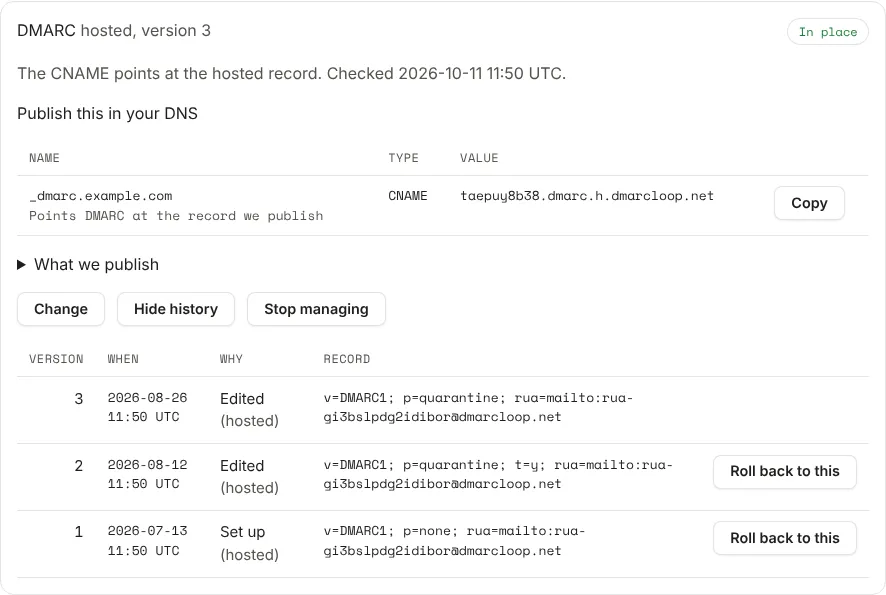
What we publish on each card shows our side of the record and its state: Live, Publishing, or Retrying if a publish didn’t go through yet. The card’s status says whether your pointer is in place; see Check the records are in place.
Changing records needs the Admin or Owner role.
Every change is a version
Versions on a record’s card lists every version: its number, when, why (for example Set up, an edit, or an adviser step) and the record. Next to an older version, Roll back to this publishes it again as a new version. Hide history closes the list.
Policy steps in one click
With DMARC hosted, the Next step panel’s Apply this step publishes the step it recommends, and while mail is being affected, Step the policy back publishes the step back. See the 14-day review.
SPF
Hosted SPF resolves your senders’ includes. With Flatten on, the record we serve lists the addresses they resolve to, so it stays under SPF’s ten-lookup limit, and we re-resolve them every six hours. See SPF and the ten-lookup limit.
Stopping
Stop managing on a hosted record stops us publishing it. Publish your own record first: once we stop, the CNAME or include points at nothing. If a plan change removes hosting, the record becomes self-managed when the change takes effect, and the card shows the record to publish yourself.
Next
Stuck? Reply to any email DMARCLoop sends, or contact us — a person reads it.