Reports Step 17 of 35
Failure reports
What DMARC failure (ruf) reports are, the little DMARCLoop keeps from each, how long it keeps them, and who can see them on the Mail security tab.
Updated
Aggregate reports, the ones behind everything else in DMARCLoop, tell you how
much mail passed and where it came from. Failure reports (DMARC’s ruf
reports, sometimes called forensic reports) are about individual messages:
some receivers send one when a message claiming to be from your domain fails
DMARC.
They’re the one view of a single message rather than a count, which is what makes them useful while someone is spoofing you. They can also hold other people’s personal data, so DMARCLoop keeps very little of each, for a short time, and records every look at them.
Failure reports are kept only on plans that include them; pricing lists which. On any other plan, a failure report that arrives is deleted unread.
What is kept
From each report we keep the sending details only:
- when the message arrived, and the sending server’s IP address;
- which check failed, and what the receiver did with it;
- the domains in the From header and the envelope, and the DKIM domain and selector.
No subjects, no recipients and no message content. Reports are deleted after a short retention: 30 days.
Where to see them
Open the domain and choose Mail security. Under Failure reports, choose Show failure reports. Each report shows Arrived (UTC), Source IP, what Failed, From / envelope, DKIM, Receiver did and Reported by.
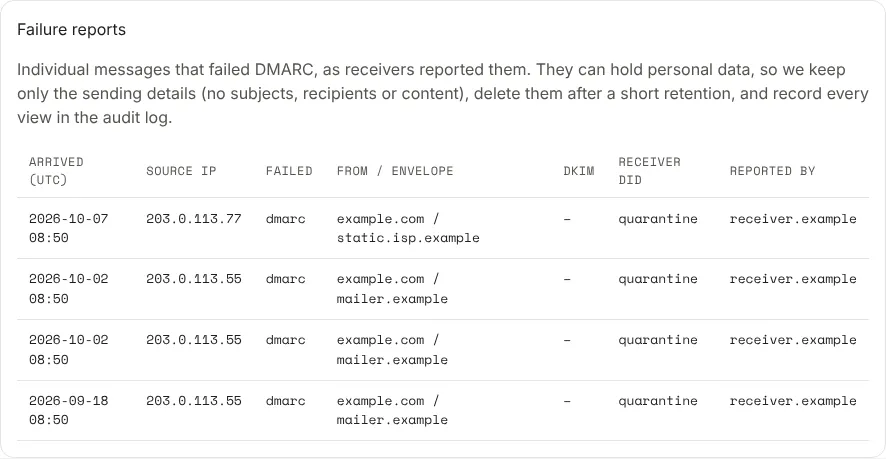
The section is shown to owners, admins and analysts. Each time someone shows the reports, it’s recorded in the audit log. They are hidden while our support staff are signed in as you to help.
Getting failure reports sent
Receivers send failure reports to the addresses in the DMARC record’s ruf=
tag. Your organisation’s address is the Forensic (ruf) one on
Report addresses, for example
ruf-…@.
The DMARC editor, on the domain’s DNS records tab and in the setup wizard, has a Failure reports (ruf) field. Choose Add our failure report address to put yours in, or type up to five addresses, separated by commas. Each has to be a plain email address, as for aggregate reports. The field is optional: leave it empty and receivers send no failure reports.
Save the record, and the ruf= tag is part of it:
v=DMARC1; p=quarantine; rua=mailto:rua-…@dmarcloop.net; ruf=mailto:ruf-…@dmarcloop.net
A hosted record changes by itself. For a self-managed one, publish the new value the record card shows at your DNS host. Your address can go in a record on any plan, but on a plan without failure reports, the reports are deleted unread when they arrive. Many large receivers don’t send failure reports at all, so expect far fewer than aggregate reports.
Next
Stuck? Reply to any email DMARCLoop sends, or contact us — a person reads it.