Getting started Step 2 of 35
Choose a plan
Every organisation starts on Free, with no card. What each limit counts, how to move to a paid plan, and what happens when you change plan later.
Updated
A new organisation starts on the Free plan. There is no card and no trial period: Free is a plan in its own right, with real limits, and you can stay on it for as long as it covers what you need. The plans and what each includes are in the table below, and on pricing.
Where to see and change your plan
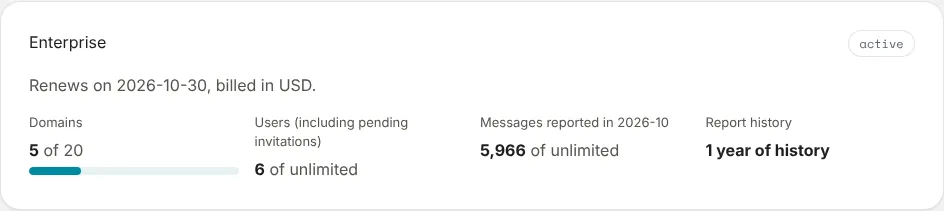
Plan and billing, in the left sidebar, shows the plan the organisation is on and how much of it you’re using, then every plan you can move to. Owners, admins and people with the Billing role can see it and change the plan.
What the limits count
- Domains: the domains you’ve added. Adding one past the limit is refused; removing one frees its place.
- Users (including pending invitations): members of the organisation, plus invitations not yet accepted. Each takes a seat.
- Messages reported in the calendar month: every message receivers reported for your domains, passing DMARC or not. This one is a soft limit. Going over holds nothing back, because the reports are your evidence; the Overview says you’re over, and if it continues you’ll need to upgrade.
- Report history: how far back report data is kept.
Some features are switched on by the plan rather than counted: hosted records, SPF flattening, TLS reporting, failure reports, alert channels, the API and white-label. Where a page offers one your plan doesn’t include, it says so and points to Plan and billing.
Moving to a paid plan
- If the organisation hasn’t paid before, choose the Currency first: USD, AUD or EUR. It is fixed from the first payment.
- Choose Choose on the plan you want. You go to Stripe’s payment page: the card is entered there and never reaches DMARCLoop.
- Once the payment goes through you return to Plan and billing, which says: Thanks. Your payment went through; the new plan appears here within a minute.
On a paid plan, Switch moves to another one, and add-ons the plan offers (such as Additional domains) appear under Add-ons. Payment methods, invoices and cancellation opens Stripe’s customer portal, where you update the card, download invoices and cancel. See Manage billing and invoices.
Changing plan later
Moving down a plan, or cancelling, doesn’t take anything away at once. The page shows Your plan is changing on a date, and lists what you lose then. Until that date everything keeps working, and choosing a plan that includes those features cancels the change.
When the date comes:
- Hosted records the new plan doesn’t host become self-managed: the DNS records page shows the record to publish yourself. Publish it before the date to avoid a gap. See Hosted records.
- Report history follows the new plan’s retention.
- Domains you already monitor stay monitored; the domain limit applies when you add one.
Client organisations under an MSP are billed through the MSP: their Plan and billing says This organisation is billed through its MSP. White-label is arranged with us; talk to us.
Next
Set up two-factor authentication.
The plans today
| Plan | Price | Domains | Messages | History |
|---|---|---|---|---|
| Free | Free | 3 domains | 10,000 messages a month | 30 days of report history |
| Pro | US$19/mo | 5 domains | 500,000 messages a month | 6 months of report history |
| Enterprise | US$59/mo | 20 domains | Unlimited messages a month | 12 months of report history |
Prices are in US dollars. The pricing page lists everything each plan includes.
Stuck? Reply to any email DMARCLoop sends, or contact us — a person reads it.